Back
Learn why TikTok Ads accounts get suspended, how to recover them, and key tips to prevent future suspensions effectively.
Jan 16, 2026
TikTok Ads
TikTok Ads has become one of the most powerful tools for e-commerce and digital advertisers. But for many businesses, nothing is more frustrating than waking up to a “Your ad account has been suspended” message.
When this happens, your ad delivery stops immediately, payments are frozen, and you lose access to most account features-often without a clear explanation.
This guide explains why TikTok ad accounts get suspended, how to fix it, and how to prevent it from happening again.
What does “ad account suspension” mean?
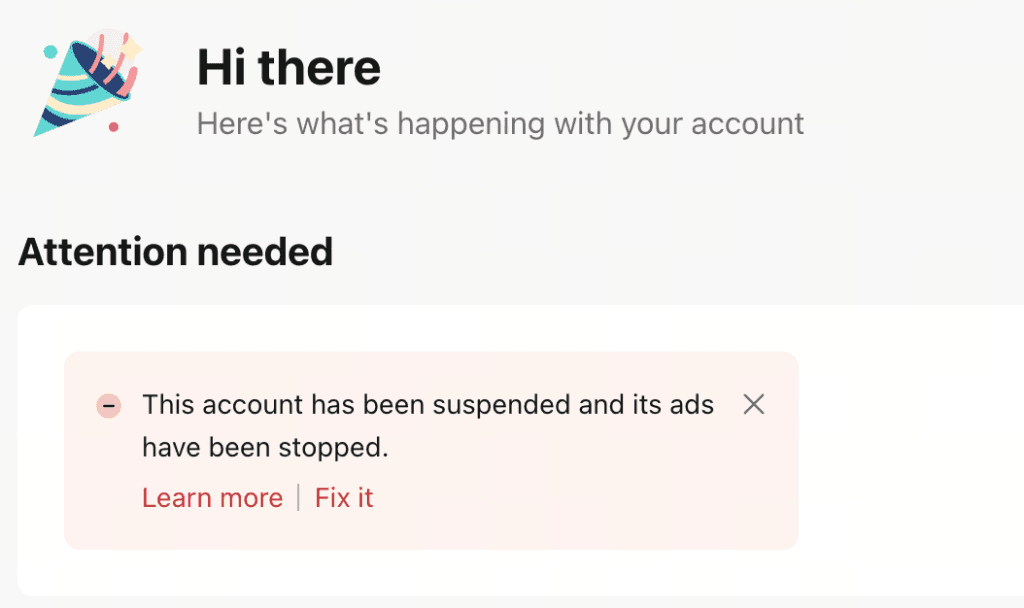
When TikTok detects policy violations, suspicious activities, or abnormal account behavior, it may temporarily suspend your account (pause your ad access) or permanently disable it in severe cases.
During suspension:
All running campaigns are paused or stopped.
You can’t create, edit, or launch new ads.
Payment and billing functions are disabled.
You must go through a review or appeal process to restore access.
Common reasons why TikTok ad accounts get suspended
Each suspension typically falls under one of the categories below. For each, we break it down into Reason – Signs – Fix to help you troubleshoot efficiently.
Policy violations
Reason: Your ad content violates TikTok’s Advertising Policies — this includes restricted products, exaggerated claims, misleading information, adult or sensitive content, or copyright infringement.
Signs:
Multiple ads rejected for “Policy Violation”
Notification: “Account suspended due to policy breach”
Fix:
Review your ad creative, text, and landing page for compliance
Remove or reword misleading or exaggerated claims
Check the TikTok Advertising Policies before submitting an appeal
Invalid landing page or redirects
Reason: Your landing page doesn’t match the ad content, includes misleading redirects, or lacks essential legal information (like Privacy Policy or Contact Info).
Signs:
Ads approved but not delivering or later rejected for “Misleading Destination”
Landing page error or unexpected redirects
Fix:
Ensure your landing page matches the product and ad content
Add visible “Privacy Policy” and “Contact Us” sections
Avoid using shortened or redirect links
Payment or billing issues
Reason: Failed transactions, expired credit cards, chargebacks, or using unverified payment sources can all trigger suspension.
Signs:
Notifications like “Payment failed” or “Billing error”
Ads stopped right after a failed payment
Fix:
Update or replace your payment method
Ensure your card or account has sufficient funds
Resolve any unpaid balance or chargeback
Submit an appeal after fixing the billing issue
Suspicious or abnormal account behavior
Reason: TikTok flags your account for unusual activity such as logging in from new IPs, using flagged proxies, or triggering fraud-detection systems.
Signs:
New accounts are suspended immediately after launching the first ads
Logging in from multiple devices or IP addresses
Fix:
Use one stable device and IP address
Avoid VPNs or low-quality proxies
If suspended for “suspicious activity,” submit an appeal explaining your legitimate business use and attach supporting screenshots
Association with a previously suspended account
Reason: TikTok detects connections (IP, card, email, device) between your account and another account that has already been suspended or banned.
Signs:
Notification: “Your account is associated with a previously suspended account”
Suspension occurs even without direct policy violations
Fix:
Use completely new information (email, payment, device, IP) for each new account
If suspended by mistake, file an appeal and provide proof of independence from the other account
Missing or incorrect business verification
Reason: TikTok may require verification documents (business license, tax info, or personal ID). Failure to provide or incorrect documents can result in suspension.
Signs:
Notification: “Please verify your business information” or “Verification pending”
Suspension before running any ads
Fix:
Upload valid business or personal verification documents
Complete verification in Business Verification under Ads Manager
Once verified, access is usually restored automatically
Low account quality or advertiser score
Reason: Repeated minor violations, high rejection rates, or user complaints reduce your “Account Health” score, leading to suspension.
Signs:
Warning notifications before suspension
Drop in ad reach or sudden increase in CPM
Fix:
Pause or edit rejected campaigns
Submit a clear, professional appeal showing corrective actions
Maintain a clean ad history for at least 30–60 days to recover your score
How to appeal and restore a suspended TikTok ad account
Once your account is suspended, you still have the opportunity to restore it through TikTok’s appeal process.
Step 1: Identify the suspension reason
Check the notification in TikTok Ads Manager and the email you received.
Knowing the root cause helps you prepare accurate documents for your appeal.
Step 2: Prepare supporting documents
Depending on your case, prepare:
Business license or personal ID
Screenshots of ad creatives and landing pages
Billing statements or payment records
A short, polite appeal statement explaining your case and your intent to comply with TikTok’s policies
Step 3: Submit the appeal
Go to TikTok Ads Manager
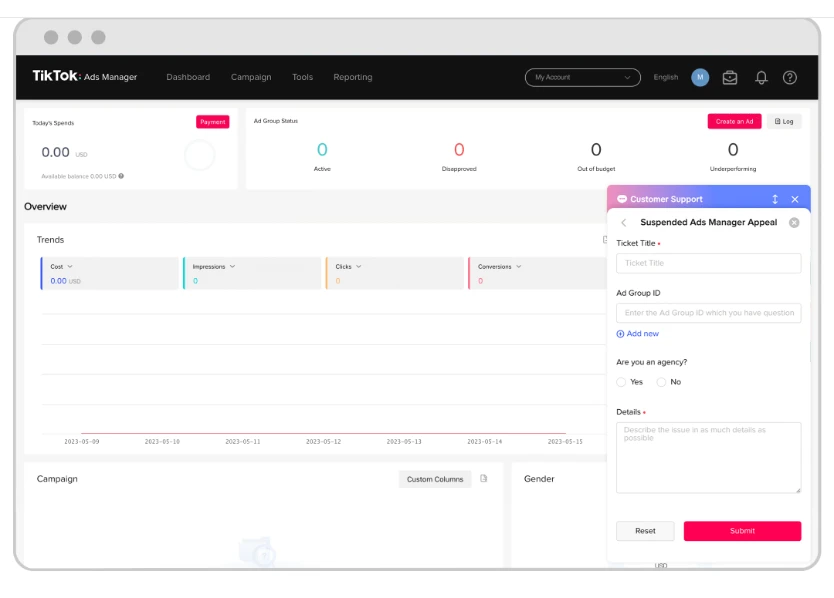
Click the “?” (Help Center) icon
Select Submit a Ticket → Account Review → Account Suspension Appeal
Fill out the form, attach documents, and submit
Review time: 1–2 business days 📅 Appeal deadline: within 180 days of suspension
Step 4: Wait and monitor your appeal
Check your email for TikTok’s response
Avoid submitting multiple duplicate appeals
If approved, your ad account will be reactivated
If rejected review the reason, fix the issue, and try again (if still within the appeal period)
TikTok ads account suspension prevention checklist
Use this checklist to keep your TikTok Ads account healthy and compliant:
Policy & compliance
Regularly review TikTok Advertising Policies and updates.
Ensure your ad creatives and captions follow content and community guidelines.
Keep your landing pages transparent, with clear product info, pricing, and return policies.
Payment & billing
Use verified, stable payment methods (avoid prepaid or third-party cards).
Match billing information (name, business address) with your TikTok Ads account.
Check that your payment method isn’t shared with other ad accounts.
Security & access
Avoid sharing devices, IP addresses, or cards with other TikTok accounts.
Enable two-factor authentication (2FA) for all users.
Regularly audit your Business Center and ad account access permissions.
Campaign management
Scale campaigns gradually — don’t double budgets or launch too many ads at once.
Maintain consistent daily spending patterns to avoid fraud triggers.
Keep your ad performance within healthy CTR and conversion thresholds.
Monitoring & maintenance
Check Account Health in TikTok Ads Manager weekly.
Address early warnings (e.g., disapproved ads or billing errors) immediately.
Keep records of past communications and appeals for reference.
A TikTok Ads suspension doesn’t always mean the end.
In many cases, it’s just TikTok’s automated system reacting to potential risks or mistakes that can be fixed.
To minimize risks:
Be transparent in your ad and website content
Keep documentation ready for verification
Appeal professionally and factually
Focus on maintaining a healthy advertiser reputation over time